Download Slime Labs free on android
APK file Slime Labs 1.1.6How to install APK / APKS / OBB file on Android
Last checked date: November 15, 2026
Short info
In general apk file Slime Labs has rating is 7.6 from 10. This is cumulative rating, most best apps on google play store have rating 8 from 10. Total reviews in google play store 2526. Total number of five star reviews received 1370. This app has been rated like bad by 483 number of users. Estimated number of downloads range between 1,000,000+ downloads in google play store Slime Labs located in category Action, with tags and has been developed by NEUTRONIZED. You can visit their website http://www.neutronized.com or send info@neutronized.com to them. Slime Labs can be installed on android devices with 4.0.3(Ice Cream Sandwich)+. We provide only original apk files. If any of materials on this site violates your rights, report us You could also download apk of Google and run it using android emulators such as big nox app player, bluestacks and koplayer. You could also download apk of Slime Labs and run it on android emulators like bluestacks or koplayer. Versions of Slime Labs apk available on our site: 1.1.6, 1.1.4, 1.1.2, 1.0.51, 1.0.50 and others. Last version of Slime Labs is 1.1.6 was uploaded 2026/15/11
Screenshots of Slime Labs

Description of Slime Labs (from google play)
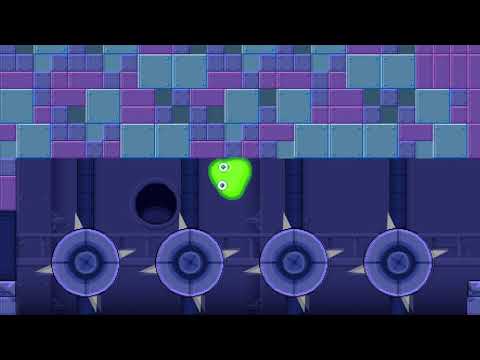
The slime is back! Venture through a laboratory full of traps and stretch your way to the goal. Slime Labs is a physics based platformer where you control a blob of green ooze that can squish, stretch, shrink, and get enormous by absorbing smaller bits of slime. Collect all the data-disks hidden in the levels and perfect all the stages.
Features:
• Super fun slime-physics
• Addicting gameplay
• Multiple endings
• Slime-tastic pixel art
• Groovy music tracks
Version history Slime Labs
New in Slime Labs 1.1.6
- Added 16kb page sizes supportAdvertisement
Please rate this app
More info
- LicenseFree
- File nameSlime Labs
- File Version1.1.6
- Package namecom.neutronized.slimelaboratory
- UploadedNovember 25, 2025

- CategoryAction
- DeveloperNEUTRONIZED
- Developer sitehttp://www.neutronized.com
- Developer emailinfo@neutronized.com
- Permissionsshow (8)
